
Learmonth and STEREO/SWAVES Data
Besides the e-CALLISTO archive, the application reads data from two further radio instruments: the ground-based Learmonth Solar Radio Spectrograph in Western Australia, and the space-based STEREO/WAVES (SWAVES) radio receivers. Both are opened from Solar Events > Radio Bursts.
Learmonth Solar Radio Spectrograph
The Learmonth Solar Radio Spectrograph, operated by the Australian
Bureau of Meteorology, records daily archive files (.srs)
in two receiver bands. Solar Events > Radio Bursts >
Learmonth opens the Learmonth Solar Radio
Browser (Figure 13.1),
which converts selected parts of a daily file into FIT files for the
main window.
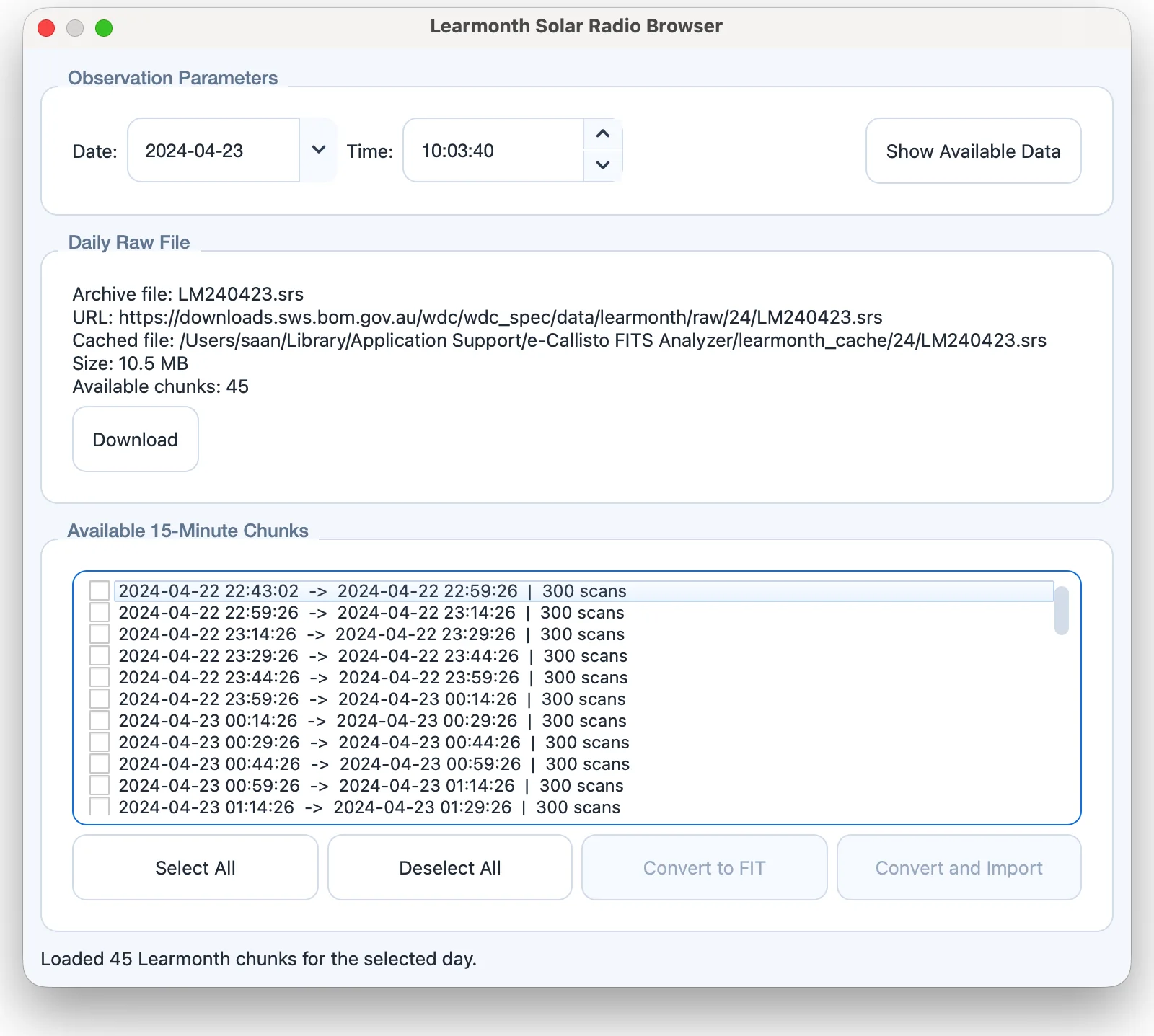
- Observation Parameters
-
choose the Date and a Time, then click Show Available Data. The daily file is read from the local cache when available and downloaded otherwise. The chunk containing the chosen time is highlighted.
- Daily Raw File
-
information about the daily archive file. Download saves the raw
.srsfile to a folder you choose. - Available 15-Minute Chunks
-
the time ranges into which the day is divided. Select All and Deselect All change the selection.
- Convert to FIT
-
converts the selected chunks to CALLISTO-style FIT files in a folder you choose.
- Convert and Import
-
converts the selected chunks and imports them into the main window, combined in time when consecutive.
Converted files carry a standard FITS header with the frequency and time axes and the observatory position, so they can be processed and analyzed exactly like e-CALLISTO data.
STEREO/SWAVES
SWAVES on the twin STEREO spacecraft (Bougeret et al. 2008) records radio spectra from 2.6 kHz to 16 MHz, directly below the CALLISTO band. A burst that drifts out of the ground-based range can therefore be followed into the interplanetary medium on the same figure. Solar Events > Radio Bursts > SWAVES opens the STEREO/SWAVES Radio Spectrograph dialog (Figure 13.2).
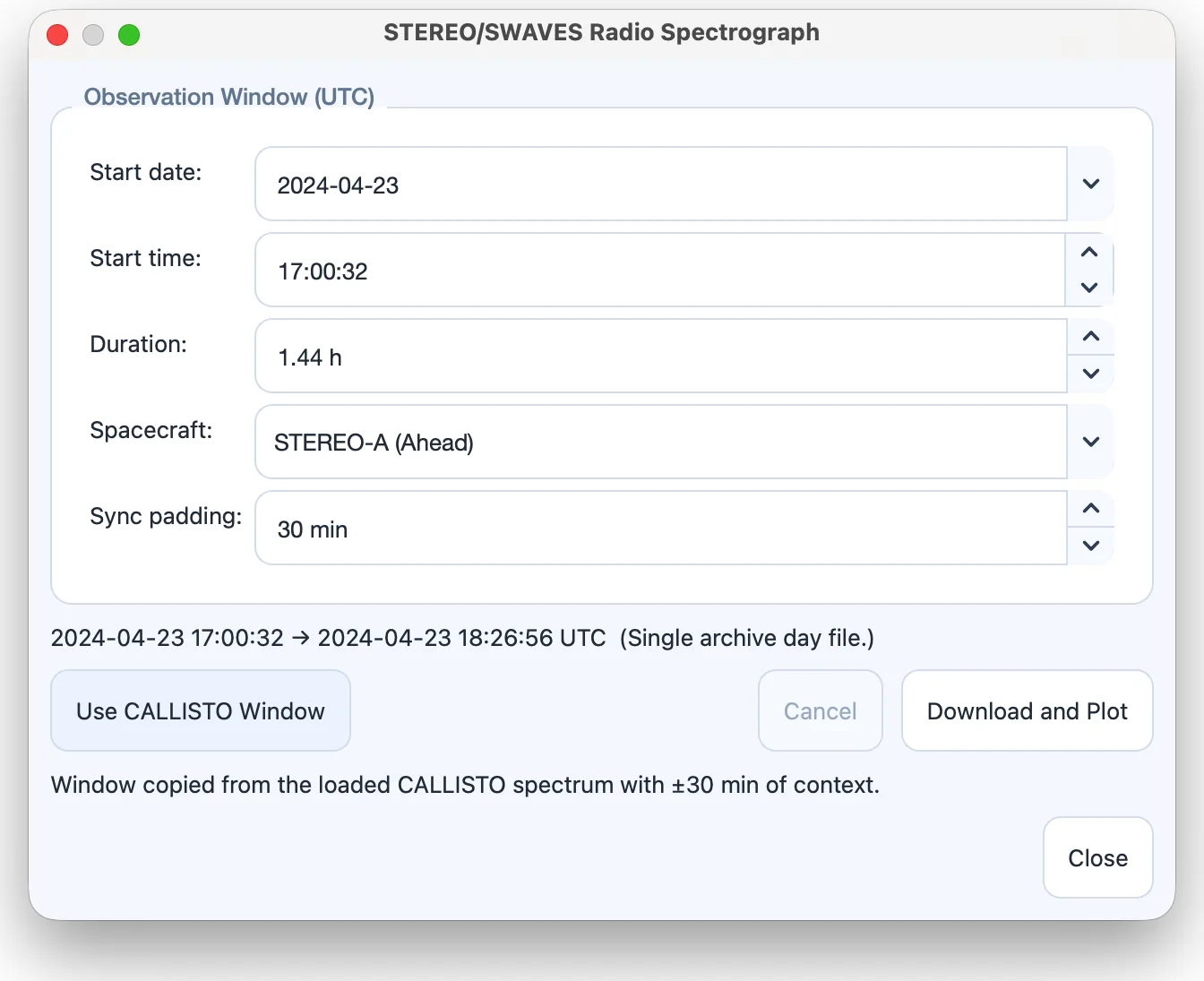
- Start date, Start time, Duration
-
the UTC window to load (0.1–24 h; default 4 h). The data are NASA/SPDF level-2 one-minute averages served as one file per UTC day; a window that crosses midnight fetches and joins both days. The archive starts on 27 October 2006, and downloaded day files are cached and reused.
- Spacecraft
-
STEREO-A (Ahead) or STEREO-B (Behind). STEREO-B is unavailable for dates after 1 October 2014, when contact with the spacecraft was lost.
- Sync padding
-
extra time added on each side when the window is taken from the CALLISTO spectrum (0–720 min; default 30 min). A Type II or Type III burst takes tens of minutes to hours to drift from the corona into the SWAVES band, so an exact match would cut off the part you want to see.
- Use CALLISTO Window
-
copies the time range of the loaded CALLISTO spectrum, widened by the sync padding. Solar Events > Sync Current Time Window updates an open SWAVES dialog in the same way.
- Download and Plot
-
loads the data; Cancel stops a running load.
The split view
Once SWAVES data are loaded, the plotting area of the main window splits into two panels: CALLISTO above and SWAVES below, on a shared time axis, so that panning or zooming either panel moves both (Figure 13.3). The CALLISTO interval is outlined on the SWAVES panel. The SWAVES frequency axis is always logarithmic and its intensity is in decibels above the instrument background, so the panel keeps its own color bar and color scaling while following the color map chosen in the sidebar. Loading SWAVES with no CALLISTO file open plots it across the whole area; it moves into the split view as soon as a FITS file is loaded.
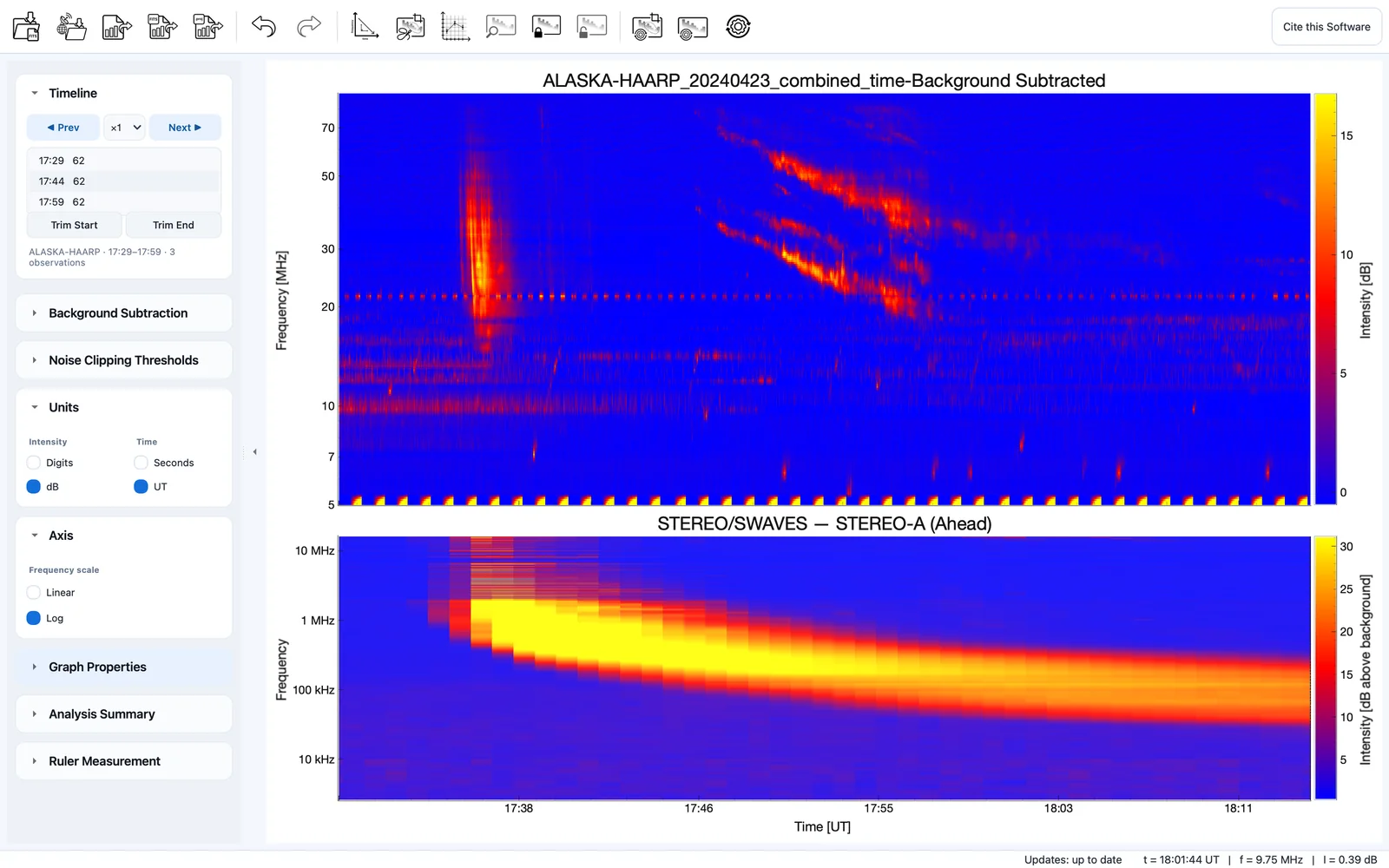
Solar Events > SWAVES Panel hides and restores the panel without discarding the loaded data. The split view is included in exported figures, saved in and restored from projects without downloading the data again, and added to project reports.
Note
The drawing, lasso, drift and measurement tools act on the CALLISTO panel only, and the data-reduction controls of the sidebar do not apply to the SWAVES panel.