
Fit an eruption in three dimensions.
Evaluate CME geometry and propagation with a Graduated Cylindrical Shell model viewed through multiple coronagraphs.
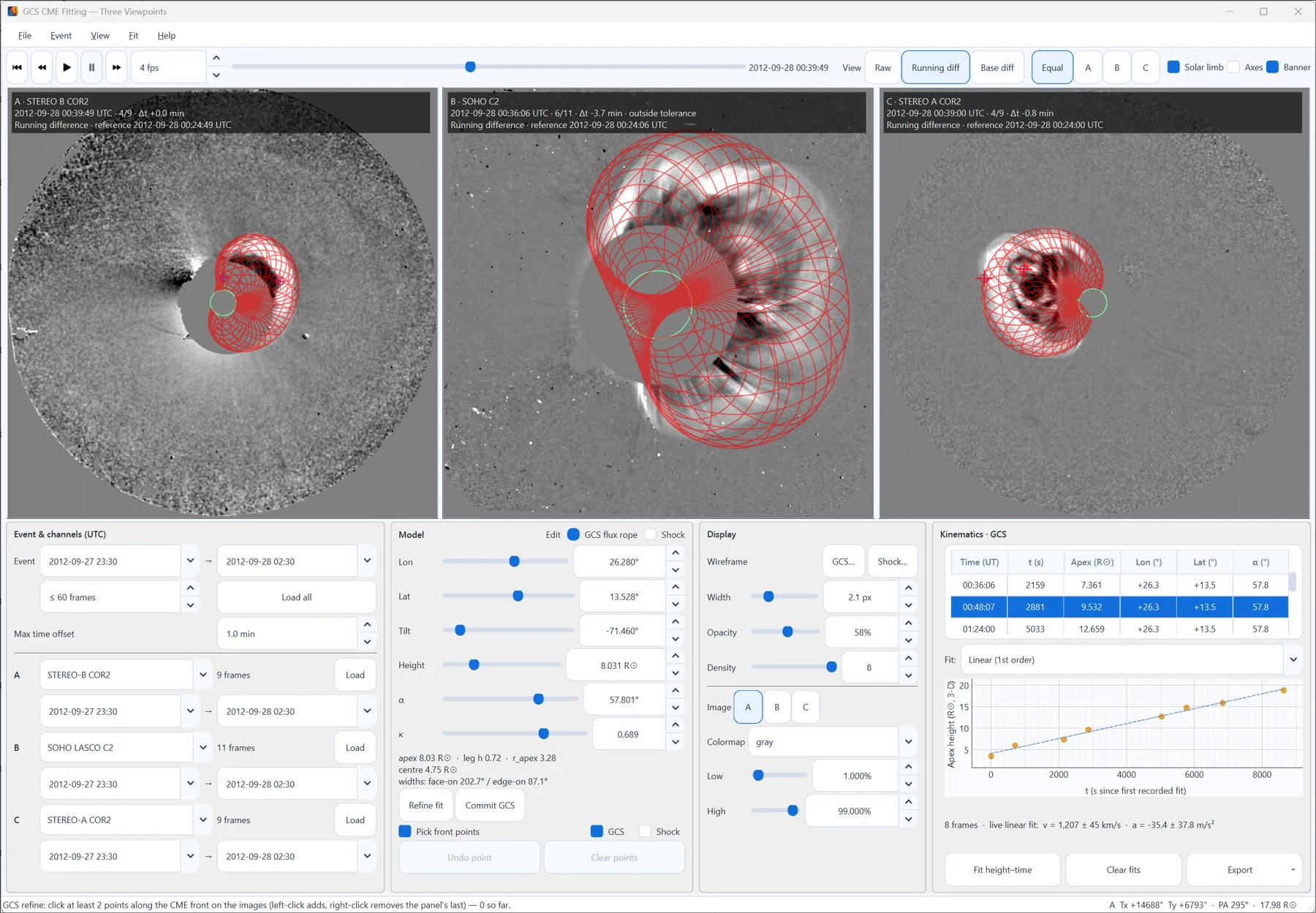
One model, several viewpoints
Open Analysis → GCS CME Fitting… from the main analyzer or the Solar Image Analysis window. The default setup combines STEREO B/COR2, SOHO/LASCO C2 and STEREO A/COR2 images, with running or base differences, playback and focus layouts.
- Choose the event. Load observations for a time range. Inspect each view’s actual UTC time and synchronization offset, and exclude frames outside your chosen maximum time offset.
- Match the geometry. Adjust longitude, latitude, tilt, apex height, half-angle and thickness. Compare the projected wireframe with the same CME front in each viewpoint.
- Refine and record. Pick front points and press Refine fit (Ctrl+R, ⌘R on macOS). Two points refine the height; more points and good viewpoint separation progressively unlock direction and shape. Commit the measurement and advance through the event.
- Evaluate propagation. Examine height–time evolution with linear, quadratic or cubic fits. Export snapshots, graphs, GIF/MP4 movies, a PDF fitting report, CSV measurements and JSON parameters with provenance.
Watch the fit evolve
Flux rope and shock fitting
The GCS flux-rope geometry and the separate spheroid or ellipsoid shock model describe different structures. Each model keeps its own front points, recorded fits and height–time measurements, so choose the observed front deliberately when refining or recording each one.
Keep the interpretation reproducible
GCS apex heights are deprojected within the selected model geometry. Derived speeds and accelerations depend on viewpoint coverage, feature selection, timing and fitting assumptions, and reported fit uncertainties do not include every source of reconstruction uncertainty. Keep source frames, parameters and point provenance with your exported results.
The complete workflow is described in Part VI of the user guide.