
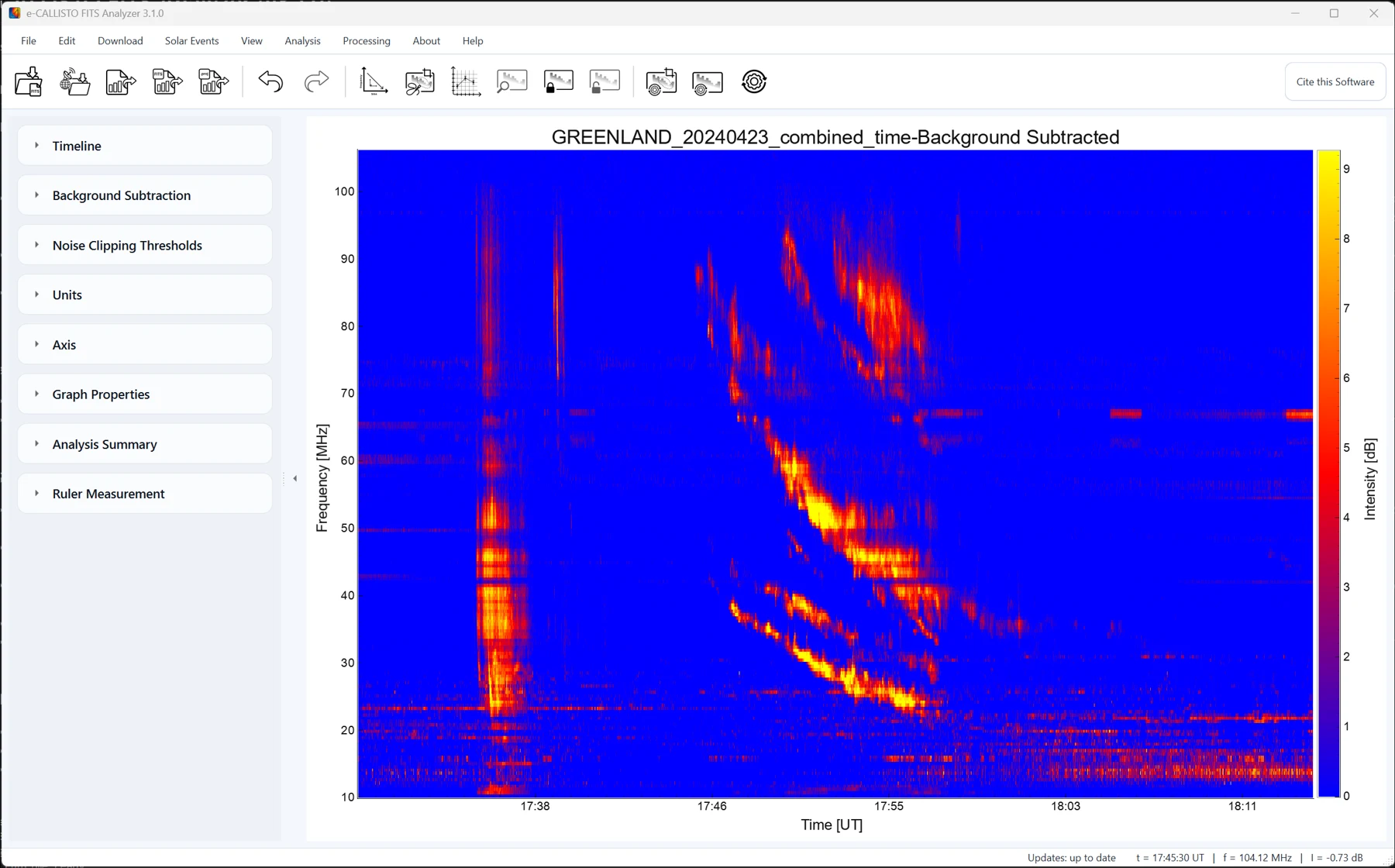
01 · RADIO
e-CALLISTO FITS Analyzer
Process and analyze e-CALLISTO dynamic spectra, isolate radio bursts, track their drift and estimate shock speeds and coronal magnetic fields.
Explore radio analysise-CALLISTO FITS Analyzer is free, open-source software for visualizing and analyzing solar radio FITS data on Windows, macOS and Linux. Process dynamic spectra, measure Type II radio bursts and connect observations with solar imaging and CME reconstruction.
Start with a radio observation or an image sequence. Both tools come in the same free software package.
Process and analyze e-CALLISTO dynamic spectra, isolate radio bursts, track their drift and estimate shock speeds and coronal magnetic fields.
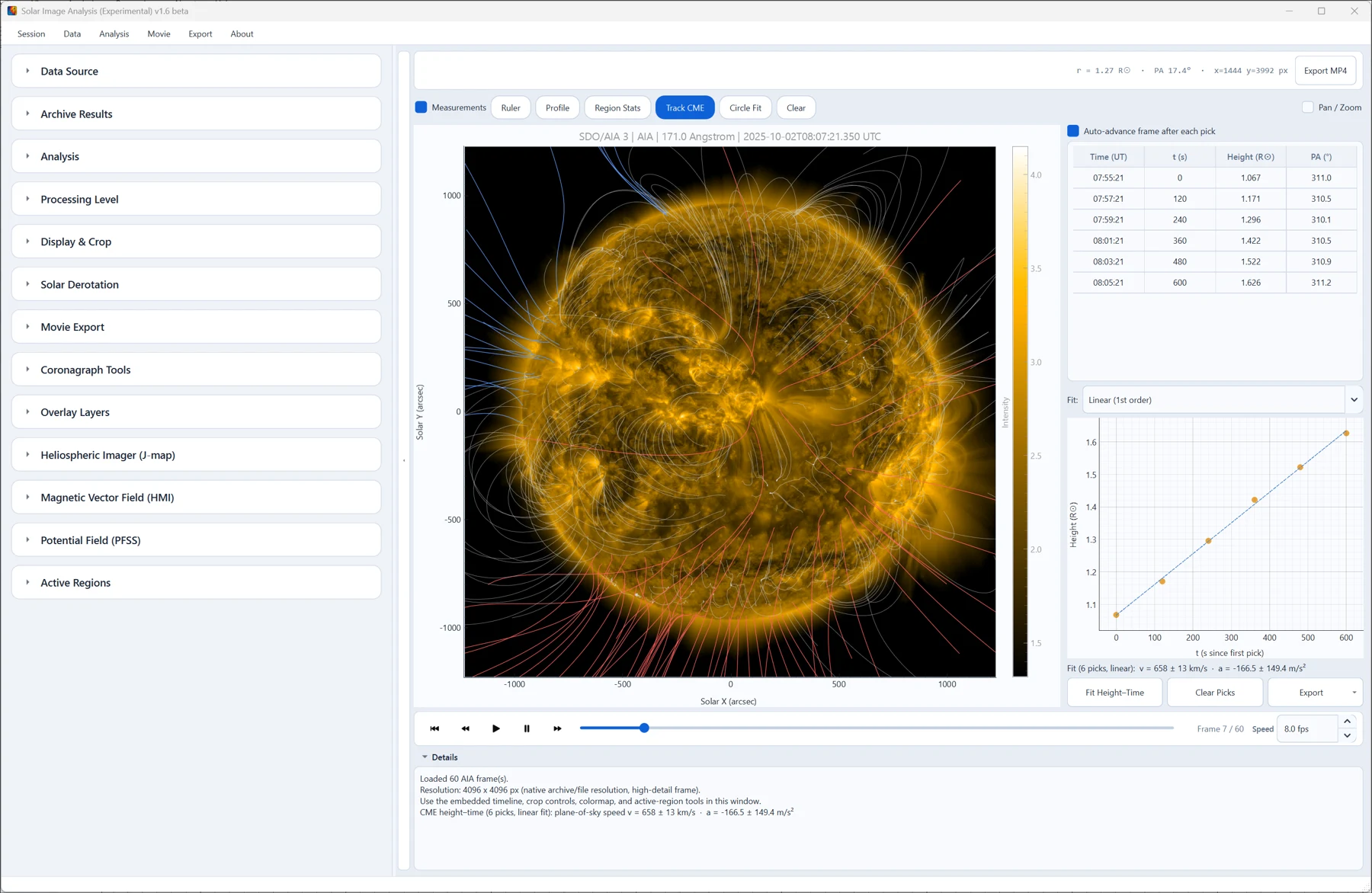
Explore radio analysisProcess and analyze solar imaging data from SDO, SOHO and STEREO through two complementary workspaces.
Open e-CALLISTO FITS files, visualize solar radio dynamic spectra and analyze Type II bursts, from background subtraction to drift-rate measurements and publication-ready figures.
Subtract the background, tune display thresholds and clean radio-frequency interference from raw spectra.
Isolate features, extract intensity maxima and quantify drift, shock speed and Type II band splitting.
Place your observation in its space weather context with GOES X-rays, CME catalogs, geomagnetic indices and solar imagery.
Choose a lightweight workspace for CALLISTO data or the complete solar analysis toolkit. Free and open source, on Windows, Linux and macOS.
Your CALLISTO data. A lighter, faster workspace.
A native Rust app designed for lightweight, responsive CALLISTO analysis. Open and combine spectra, clean interference, measure bursts and export your results in a familiar interface.
Connect your radio observation to the wider Sun.
Choose the complete toolkit when your work also needs solar imaging, three-dimensional CME reconstruction, space-based radio or space-weather context.
Two connected workspaces bring solar images, measurements and three-dimensional CME fitting into your analysis. PFSS & GCS new in v3.1.0
Process and analyze SDO, SOHO and STEREO observations. Connect image sequences with CME measurements and magnetic-field context.
Fit a Graduated Cylindrical Shell to coronagraph images from multiple viewpoints. Evaluate CME geometry and propagation with a shared three-dimensional model.
Record fits, fit the shock separately, compare height–time evolution and export your fitting results.
Explore GCS fitting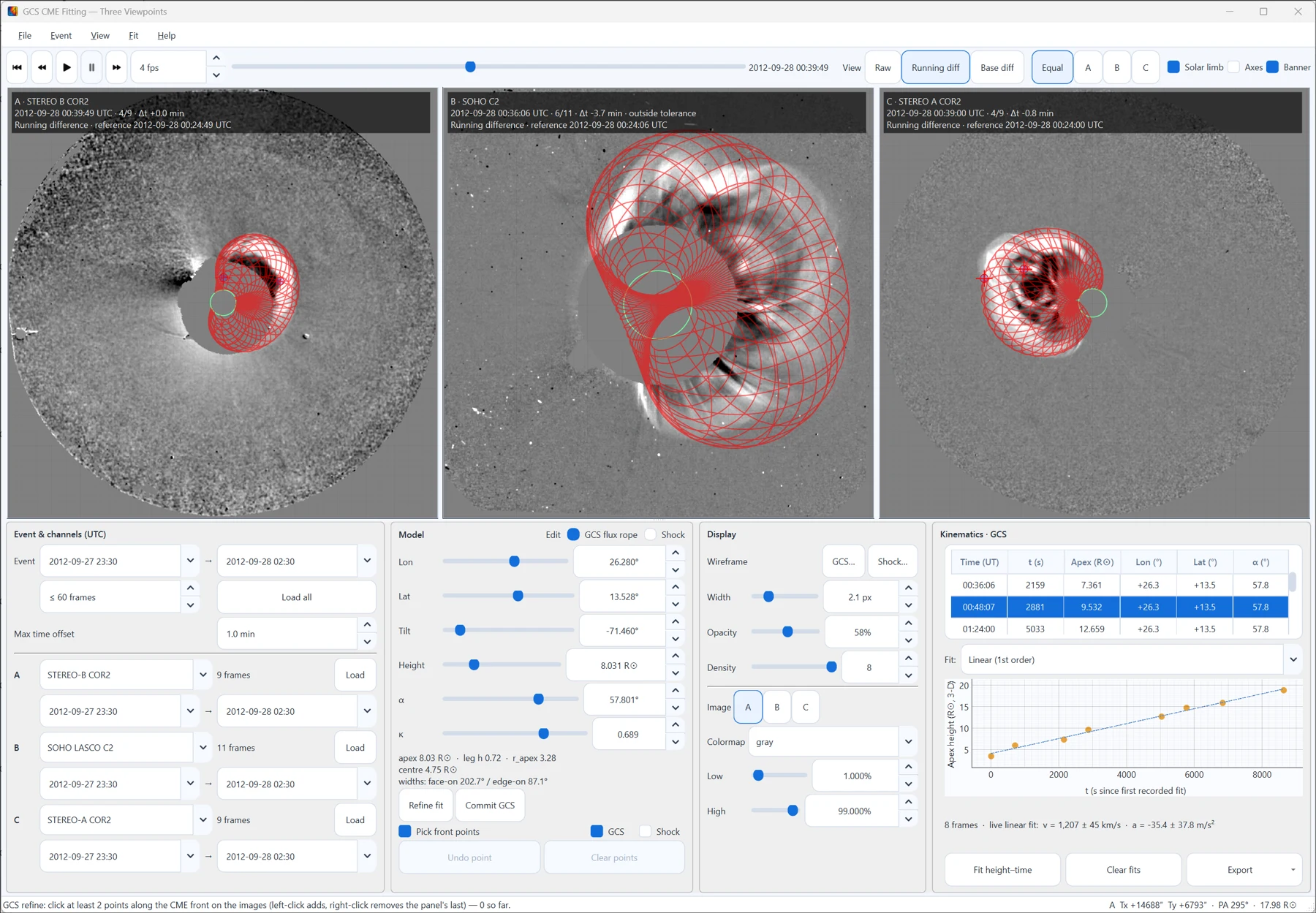
Watch image sequences and CME fits exported from the Solar Image Analyzer and GCS tools.
A new Lite edition, event context on your spectrum, multi-panel event figures and expanded geomagnetic analysis. Full release notes
The e-CALLISTO FITS Analyzer user guide covers every window, method and formula, from opening solar radio FITS files to three-dimensional CME reconstruction. Read it online or keep the PDF.
Short answers to common questions. Each links to the user guide chapter that covers it in depth.
Choose Analyzer Lite for a lightweight CALLISTO radio workflow, including spectrum processing, burst measurements and exports. Choose the full analyzer for solar imaging, PFSS, GCS CME fitting, SWAVES and space-weather context. Both editions are available for Windows, Linux and macOS.
Compare editions and downloadse-CALLISTO FITS Analyzer is a free, open-source desktop application for Windows, macOS and Linux. It visualizes, processes and analyzes the solar radio dynamic spectra recorded by the e-CALLISTO spectrometer network, together with solar images from SDO, SOHO and STEREO.
IntroductionUse File > Open (Ctrl+O) or drag the files onto the main window. The analyzer reads .fit and .fits files, compressed or not, and merges consecutive files into one continuous dynamic spectrum.
Opening and combining dataThe built-in downloader retrieves FITS files directly from the e-CALLISTO archive, for one station or for every station that observed an event, and browses the Monstein burst list. Learmonth and STEREO/WAVES data are available too.
The e-CALLISTO FITS downloaderYes. Subtract a mean, median or median (dB) background, clip noise and clean radio-frequency interference (RFI) to bring out faint solar radio bursts in the spectrogram.
Viewing and processing toolsIsolate the burst, extract or track its intensity maxima and fit its backbone. The analyzer derives the drift rate, shock speed and shock height with five coronal density models, and the magnetic field from band splitting.
Type II burst analysisNo separate Python installation is needed: the installers for Windows, macOS and Linux include everything the analyzer uses. It is free and open source under the MIT license.
Installation and startup