
Event Context and Geomagnetic Response
A radio burst is one moment in a chain that can run from a flare and a coronal mass ejection at the Sun to a shock and a geomagnetic storm at Earth one to three days later. The tools in this chapter place the loaded event in that chain: the Geomagnetic Response shows what Earth’s environment did around the event, the Event Context Strip draws the flare, CME, storm and burst catalogs above the spectrum, and the Event Figure composer combines everything into one publication figure. The same information opens the project report’s Event Story (Section 10.6).
The event and automatic fetching
The tools work around an event time, which is set by the most recent of these actions:
loading data in the main window — the observation start of the loaded spectrum (FITS: …);
selecting a row in the downloader’s Burst List (Burst list: …);
selecting a day or a file in the e-CALLISTO downloader (Downloader: …).
The current event is named at the top of the Geomagnetic Response card and window. After a burst-list or downloader selection, Use loaded data returns to the event of the loaded file. Nothing ever pops up on its own: the card updates, and the window opens only when you ask for it.
Solar Events > Fetch Event Context Automatically (on by default, and remembered) fetches the geomagnetic response, and the event catalogs while the strip is shown, whenever data are loaded or an event is selected. Turn it off to download nothing on your behalf: the card then asks you to press Refresh, and Refresh, Refresh Event Context and File > Generate Project Report... still fetch when you ask.
Geomagnetic Response
The Geomagnetic Response follows the event to Earth. It covers, by default, one day before the event start to seven days after, on a single UTC axis. Two views show it: a summary card in the main window’s sidebar (Section 6.8) and the full window, opened with Solar Events > Geomagnetic > Geomagnetic Response… or the card’s Open window button (Figure 15.1).
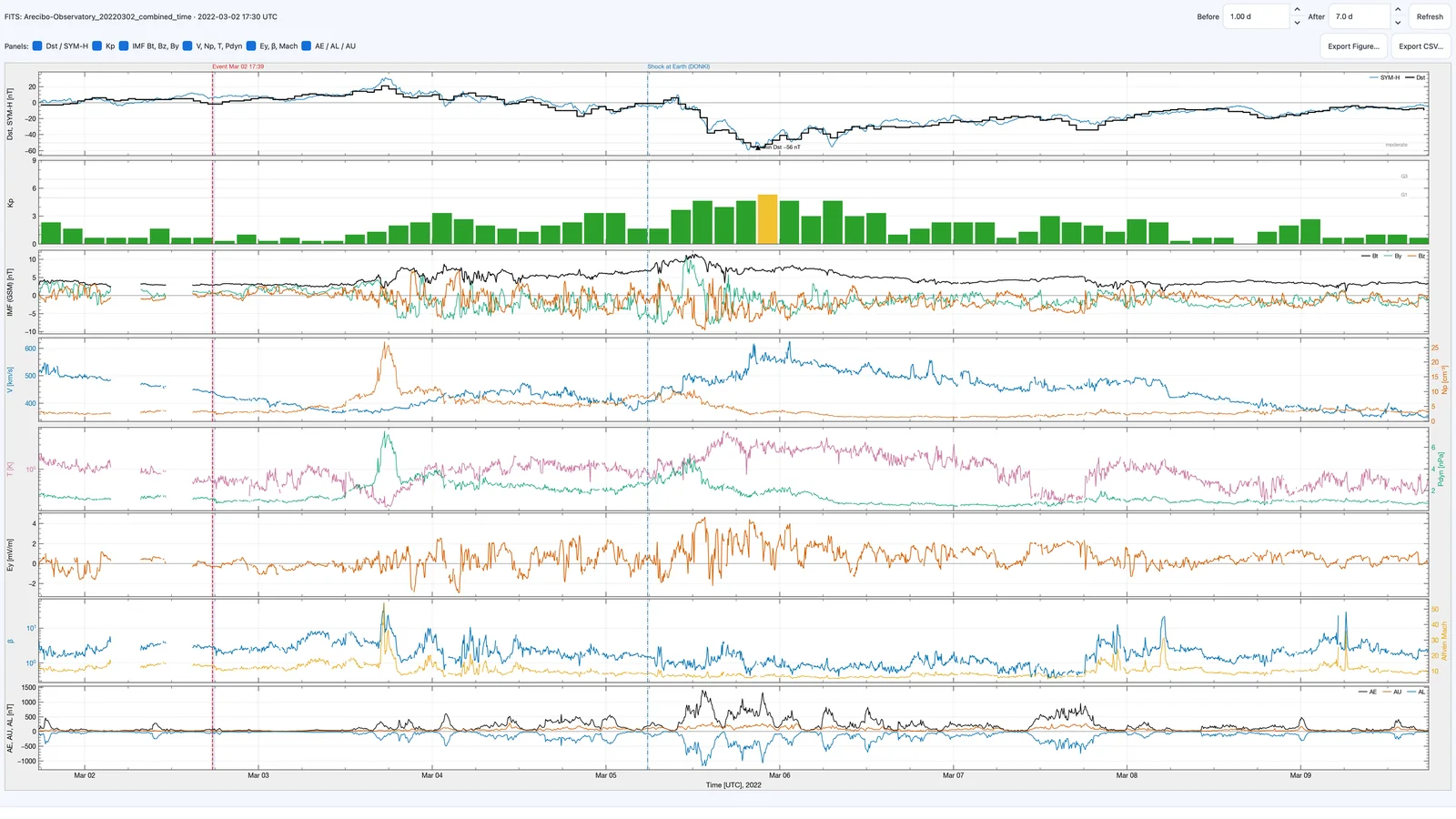
Controls
- Event
-
the event the response is shown for, with where its time came from.
- Before, After
-
the span shown before and after the event start (0.25–10 days before, default 1; 0.5–30 days after, default 7).
- Refresh
-
fetches the response again.
- Panels
-
check boxes that choose the panels shown (Table 15.1). The choice is remembered between sessions.
- Export Figure…
-
saves the selected panels as an OriginPro-style figure (PNG, PDF, SVG, EPS, TIFF or JPG), black on white whatever the application theme.
- Export CSV…
-
saves every series as CSV, with a provenance column naming the archive or spacecraft of each value.
A line below the panels lists notes, such as data that are not yet published.
| Panel | Content |
|---|---|
| Dst / SYM-H | Kyoto Dst (final, provisional or real-time, month by month) with the 1-minute SYM-H index. The scale follows the data; the storm levels it reaches (moderate , intense , severe nT) are dotted, and the minimum is marked with its value. |
| Kp | GFZ Kp as bars coloured by NOAA G level, with the G1 (Kp 5) and G3 (Kp 7) levels dotted. |
| IMF Bt, Bz, By | Interplanetary magnetic field magnitude and components (GSM). |
| V, Np, T, Pdyn | Solar-wind speed and proton density, temperature and dynamic pressure; each half of the panel has two scales coloured like their lines. |
| Ey, β, Mach | Dawn–dusk electric field, plasma and Alfvén Mach number. |
| AE / AL / AU | Auroral electrojet indices. |
The Dst/SYM-H, Kp, IMF and plasma panels are shown by default.
Markers
The event start is a dashed red line and the interval of the loaded radio data is shaded. DONKI interplanetary-shock arrivals at Earth, geomagnetic storms and the CMEs they are linked to are marked with labelled vertical lines. When the labels crowd, they are shortened (for example CME 1330, Shock, Kp 9.0) and the least important are left unnamed, though their lines remain. Markers outside the plotted span are not shown.
Data sources
Solar wind, IMF and derived parameters come from the OMNI 5-minute data set (King and Papitashvili 2005), which is time-shifted to the nose of Earth’s bow shock and also carries the SYM-H (Iyemori 1990) and AE (Davis and Sugiura 1966) indices.
OMNI is published with a delay of a few weeks. For the most recent days the measurements of DSCOVR (NOAA NCEI archive) or NOAA SWPC’s real-time solar-wind feed are used instead. They are measured at the L1 point, upstream of Earth, and are labelled L1, not time-shifted to the bow shock; their Ey, and Mach number are computed with OMNI’s formulas (Appendix D).
SYM-H and AE have no such stand-in and are reported as not yet published until OMNI includes them.
Dst comes from the World Data Center for Geomagnetism, Kyoto, and Kp from GFZ Potsdam, as in the stand-alone viewers (Chapter 14).
Markers come from NASA’s DONKI database (NASA Community Coordinated Modeling Center n.d.) (Section 15.3).
A source that fails is reported in the notes while the others still load. The response is saved in the project, so a reopened project shows it without fetching anything, and the project report includes it.
The Geomagnetic Response card
The sidebar card (Section 6.8) summarizes the same response in five rows: the Dst minimum (with when it occurred and how many hours after the event start), the Kp maximum and its NOAA G level, the most southward Bz, the fastest solar wind and the storm class (Table 15.2). When the event moves to another hour, the previous event’s numbers are cleared rather than shown under the new event.
| Storm class (Dst min) | G level (Kp max) | Notes |
|---|---|---|
| weak: nT | G1: Kp 5 | Classes after Gonzalez et al. (1994). |
| moderate: nT | G2: Kp 6 | |
| intense: nT | G3: Kp 7 | |
| super: nT | G4: Kp 8 | |
| G5: Kp 9 | NOAA space-weather scales (NOAA Space Weather Prediction Center n.d.). |
Caution
A storm within the window is not necessarily caused by the event: it may have been driven by an earlier eruption. Compare the storm’s timing with the shock arrivals and the transit time from the Sun before attributing it. The project report’s Event Story makes this check (Section 10.6).
Event Context Strip
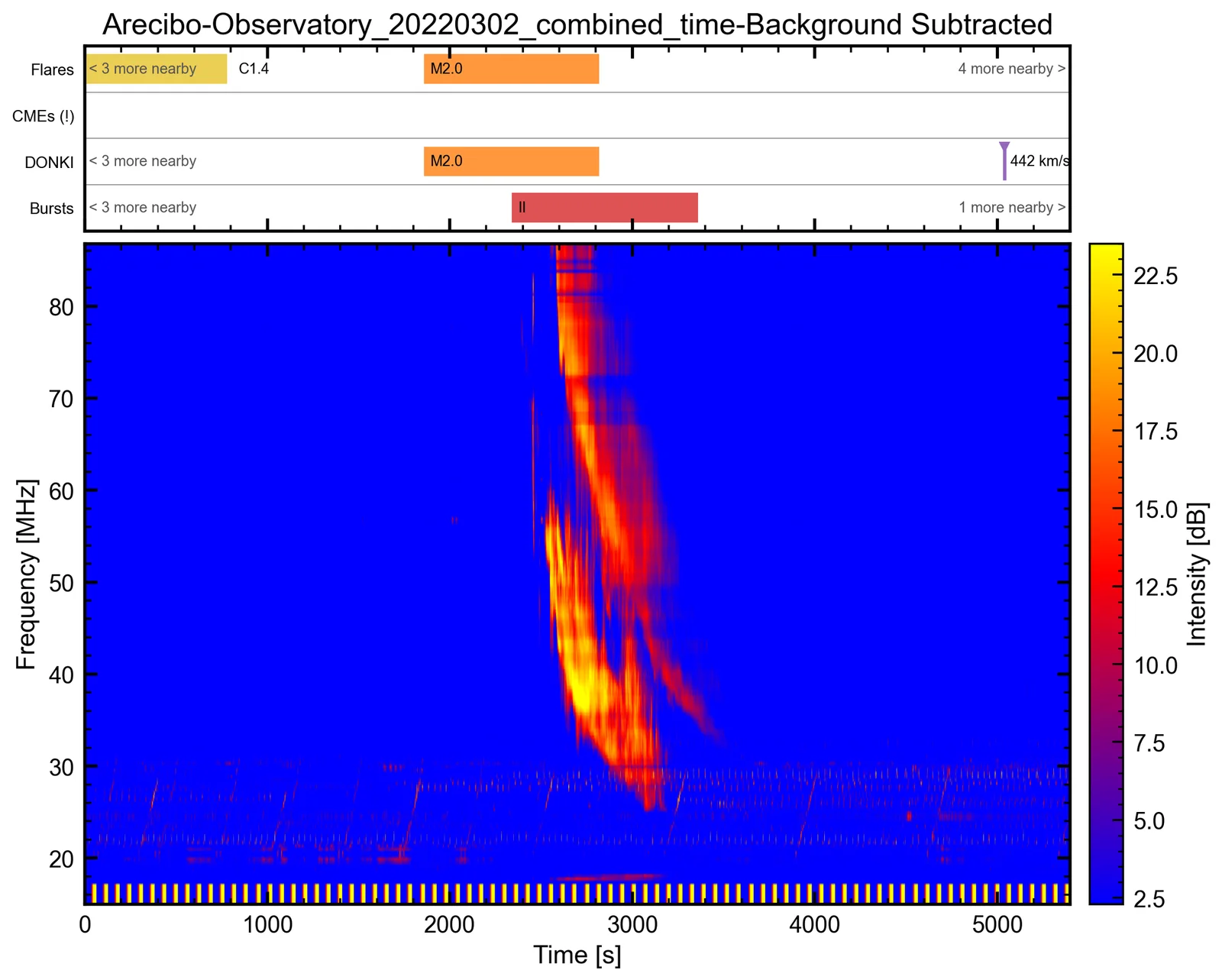
View > Event Context Strip adds lanes above the dynamic spectrum, on their own time axis, in both the Classic and the Modern view (Figure 15.2). Each lane shows one catalog (Table 15.3); View > Event Context Sources chooses the lanes, and View > Event Context Sources > Refresh Event Context fetches them again.
| Lane (source menu entry) | Content |
|---|---|
| Flares (GOES/SWPC) | The NOAA SWPC flare list, through the Heliophysics Event Knowledgebase (HEK), as bars coloured by GOES class. |
| CMEs (CDAW) | The CDAW SOHO/LASCO CME catalog, at the first C2 appearance, with speed and width. |
| DONKI | NASA DONKI CMEs, flares, interplanetary shocks, geomagnetic storms and SEP events. |
| Bursts (e-CALLISTO) | The e-CALLISTO (Monstein) burst lists, as bars with their burst type. |
Hover over a marker to read its details.
Events up to six hours outside the plotted time range are counted at the edge of their lane, for example 2 more nearby.
The catalogs are cached on disk, one file per source and UTC day. Days within the last 30 days are refreshed after a day, because catalogs are still being filled in; older days never expire.
A day that a catalog cannot answer for yet — a CDAW month that has not been published, or a DONKI service that failed — is not cached. It is asked for again next time, and its lane is marked (!) with the reason in the status bar.
While it is shown, the strip is included in Export Figure and in the project report, and it is saved in the project. A project keeps its own strip and source choices without changing your View-menu preference.
Event Figure
File > Export As > Event Figure… opens the Event Figure Composer (Figure 15.3), which builds one publication figure of the whole event with a live preview. Figure 15.4 shows an example.
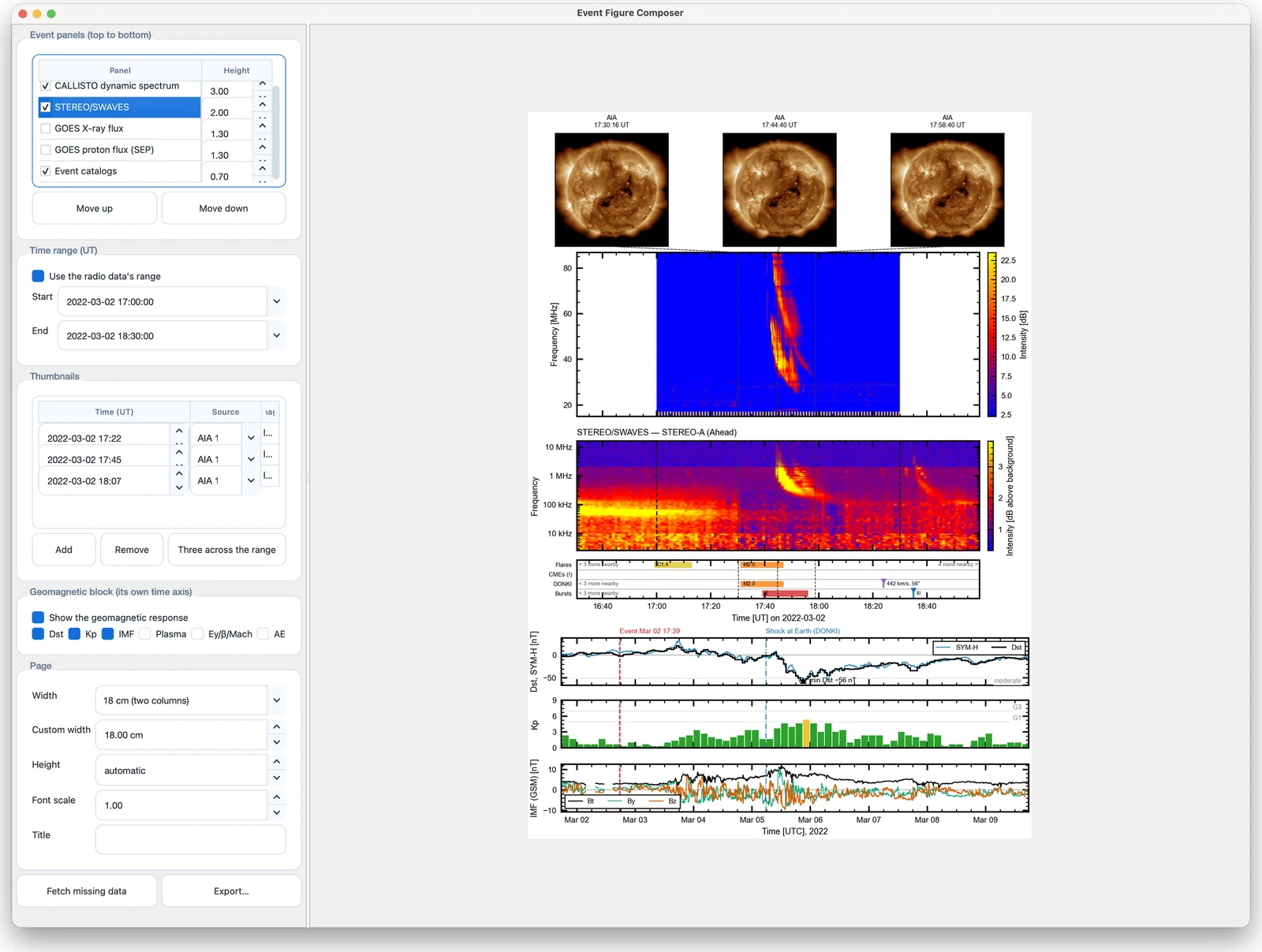
- Event panels (top to bottom)
-
tick the panels to include — CALLISTO dynamic spectrum, STEREO/SWAVES, GOES X-ray flux, GOES proton flux (SEP) and Event catalogs — set each panel’s height, and reorder them with Move up and Move down. The spectrum, GOES X-rays and catalogs are selected by default.
- Time range (UT)
-
Use the radio data’s range, or a Start and End of your own.
- Thumbnails
-
a table of images (Time (UT), Source, Image) drawn as a row above the panels. Add and Remove edit the list and Three across the range adds three evenly spaced thumbnails. Sources are AIA, EIT, LASCO C2 and C3, and STEREO COR1 and COR2. A frame already loaded in Solar Image Analysis or the GCS window near the chosen time is used as it is processed there; otherwise a Helioviewer image is fetched. Each thumbnail’s time is drawn as a dashed line down through the panels.
- Geomagnetic block (its own time axis)
-
Show the geomagnetic response adds the Geomagnetic Response panels below the event panels, on their own days-long axis, with the radio interval shaded and the DONKI markers; check boxes choose its panels.
- Page
-
Width: 8.8 cm (one column), 12 cm, 18 cm (two columns) or custom (4–40 cm); Height: automatic or fixed; Font scale (0.5–2); and a Title.
- Fetch missing data
-
downloads what the chosen panels and thumbnails need and is not yet loaded (GOES X-rays and protons, thumbnails). The status line reports what was fetched.
- Export…
-
saves the figure as PNG, PDF, EPS, SVG, TIFF or JPG.
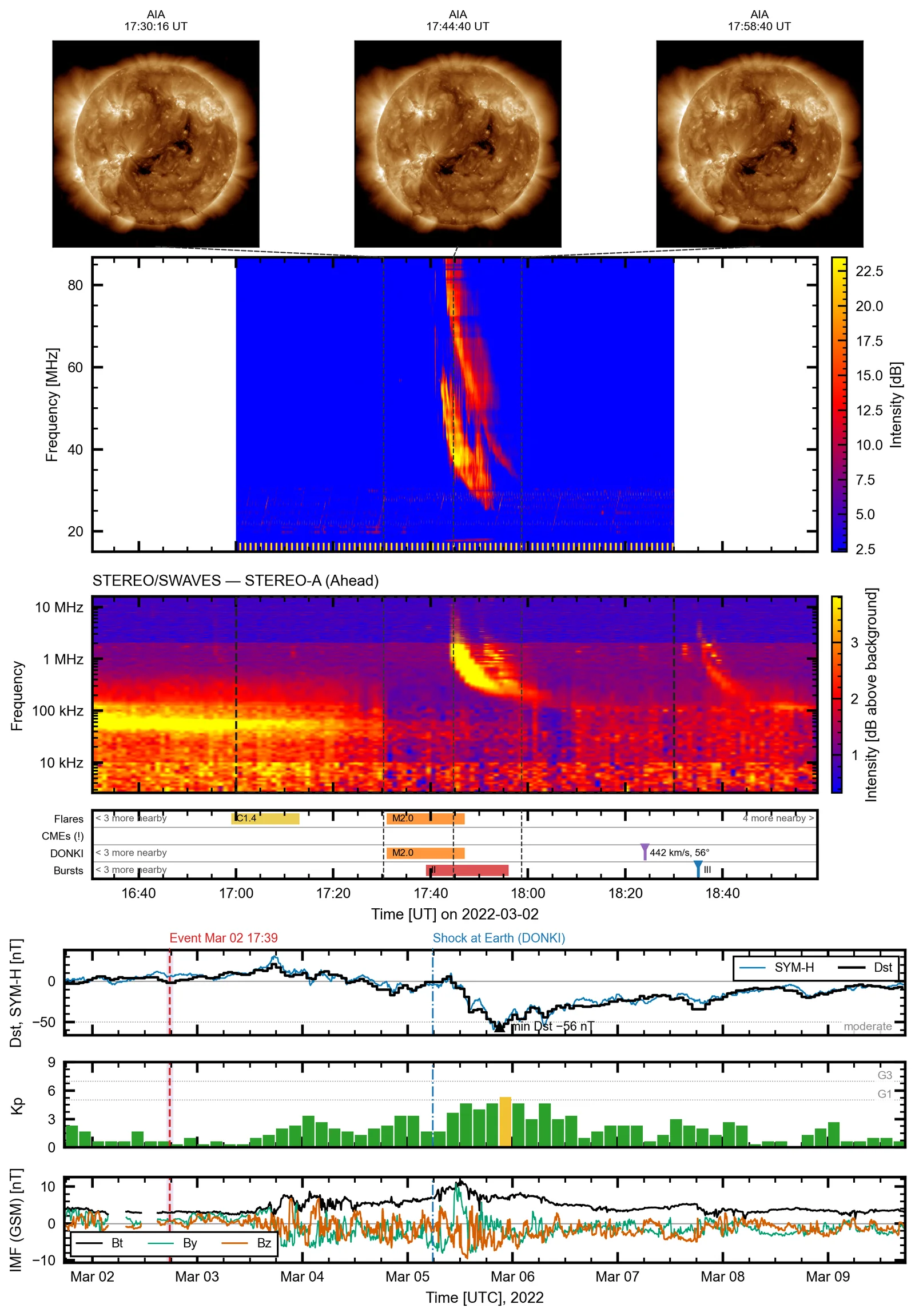
The composer’s settings are saved in the project. Fetched GOES and proton series are used only for the event and time range they were fetched for, so after loading another file press Fetch missing data again.